6 posts tagged with "tech"

Tech tag description

View All Tags

Internet on planes is magic, even if it’s broken

· 6 min read

Everyone deserves great wifi in the sky when their airplane is equipped with it. We know when your flight’s wifi sucks, and we do our damndest to make sure it doesn’t. I pinky swear.

Fewer than 1% of flights have an actively disrupted connection at any point in time, and less than 0.1% of flights above 10,000 feet have connection disruptions. More on why that altitude matters later.

When your flight’s wifi isn’t working, here’s what’s probably going on.

/* truncate */

Inflight wifi is an engineering feat. An antenna on a fast-moving plane must point at an exact spot in the sky… or the connection breaks. It’s like a camel walking through the eye of a needle, an insane carnival game, or that knuckle-clenching manual burn scene in Apollo 13.

Want to see for yourself how hard connecting to a precise spot in the sky is? iPhone owners can try connecting to a satellite from the ground by going to Settings → Messages → Satellite Connection Demo.

Look to the sky

Inflight wifi only works with a clear view of a specific spot in the sky.

If you’re on the ground, a building, a mountain, or something else can block the line of sight between the plane and the satellite. Closing the boarding door will trigger the plane’s wifi network to appear, but the internet won’t work if your plane is waiting to push behind a building.

In the air, the view of the sky improves, but it’s still not always clear. Water, whether it takes the shape of fog, clouds, or rain, makes radio waves scatter, just like it turns the sun’s rays into a rainbow. The higher we get, the clearer the view usually is.

The sun can also blind the view of the sky, just like those times of day where you’re driving and have so much glare you can barely see.

Keeping up with motion

Even with a clear view, the plane’s antenna still has to point at the right spot in the sky. Clever gyroscopic hardware cradles the antenna above our seats and keeps it pointed at that right spot most of the time.

The same kind of hardware keeps your smartphone videos looking steady while you walk, but start running and it’ll lose sight of your subject.

That 10,000-foot altitude number makes a difference because taking off, climbing, and getting ready to land cause disorienting forces. When this happens, the equipment has to recalibrate. The physics of conservation of energy means it can take a few minutes of gentle, level flying to settle back into place and find that magic spot in the sky.

## Too hot to handle

One of the best ways to break electronics is to put them in extreme heat. Take your iPhone outside and keep the screen in full sunlight and you’ll see it complain about overheating.

The spot where a plane’s internet servers live is tiny and they get stifling hot, especially on the ground. The cooler temperatures at cruise altitude are much friendlier.

This wear and tear causes things to eventually break down. A plane could be routed to fly for several days until it reaches a maintenance base that has the right replacement part in stock.

If the plane’s antenna has an issue? That’s sitting at the top. We have to fetch a crane to hoist up a cradle that’s heavier than what most people can bench press. Even though a flight without wifi sucks, we’re pretty sure our customers want to fly more than they want us to cancel a flight so we can fix the internet connection.

The flight attendants

Flight attendants hear and see it all. My besties who fly for Breeze, Delta, Alaska, Air France, and others commiserate with me about rude passengers. Many of those kerfuffles are about the Inflight internet. We have lots of laughs so that we don’t cry about Mister Big Mad sitting in 4A.

So what happens when someone asks a flight attendant to reset the system? Usually… nothing other than waiting for it to self-heal.

That’s not what they’ll say, of course. Most flight attendants know they need to sell their performance to make their day easier. They might do it with an intercom chime, or they might go tap random buttons on their cabin management system screen. They’ll probably wait several minutes to come back to your row telling you that they reset it.

What they will not do is actually turn the system off and on again. That kicks off a ten to twenty-minute boot cycle. That “reset” is a charade. A placebo. Flight attendants usually wait several minutes before coming back to your row because that’s usually the time the system needs to recalibrate and find that magic spot in the sky again.

On many planes, the servers that manage the internet connection also control the seatback screens. A reboot means you’d see everyone’s screen go black. What flight attendant wants to piss off an entire plane full of people right before cabin service?

We actually monitor it and make it better

We know internet in the sky matters. We want internet when we fly, and we know you want it when you fly.

We monitor connectivity on every flight. We observe metrics like the number of devices connected, GB of data served, throughput rates, etc. We know what flights go dark, when, where, and for how long. Millions of sessions going on in the sky all day, every day. It’s impressive.

System engineers at partners like Viasat take these mountains of log data and figure out improvements so that fewer and fewer disruptions happen. Why? Because they want inflight wifi that works too.

It sometimes takes years for their clever improvements to make it to your plane. Many hardware changes must undergo certification from aviation authorities like the FAA and airline engineering departments before we can begin rolling them out one plane at a time.

Get connected

If the internet on your next flight isn’t working when you open the page, pause for a moment. Look outside. You’re flying! Think about the turns you just made in the sky, and the forces of getting pushed into your seat while blasting off from the ground. Imagine the antenna trying to find that magic spot way off in space.

If you’re in the mood, connect with the person sitting next to you for a moment instead of obsessively refreshing your phone browser.

By the time you’ve looked around and noodled through all that, the internet connection will probably be live again. Have a nice flight!

--====|====--
|

.-"""""-.
.'_________'.
/_/_|__|__|_\_\
;'-._ _.-';
,--------------------| `-. .-' |--------------------,
``""--..__ ___ ; ' ; ___ __..--""``
`"-// \\.._\ /_..// \\-"`
\\_// '._ _.' \\_//
`"` ``---`` `"`
How we handle books could keep our ai costs lower

· 5 min read

There’s a quiet, consistent pattern with digital platforms: once a platform scales, owners optimize for rent extraction and make it more expensive no matter how “efficient” things started out.

AI tools are heading down the same path. To keep rent seekers honest, we need designs and use patterns that resist the “always more expensive” trajectory.

A few concepts of budget-friendly social infrastructure for AI could help keep our costs sustainably lower. Small prototypes could begin bringing them to life.

/* truncate */

A rich body of knowledge: libraries

AI infrastructure and the way we use it can borrow from various conventions we use at libraries. A library works because it balances three things:

  • Access is easy
  • Community can be broad and open
  • Costs are shared and amortized
  • Availability is made equitable with holds, returns, and time windows

1) The model library

“Checkout a model license for a loan period.”

Instead of paying full price for every request or tying everyone permanently to a fixed model, organizations (or shared platforms) could offer time-boxed “model availability windows.”

What this could unlock:

  • People can choose tools that match the moment, without permanently locking in the most expensive option.
  • Idle compute can be reduced because access can be provisioned for when people actually need it.

Why it maps to real usage habits:
We already love fast and low-friction workflows (e.g., one-click download, holds, and waiting until items are available). People don’t always optimize for “instant,” they optimize for “works when I need it.”

Prototype ideas:

  • A “checkout” UI that handles holds and returns for model access.
  • A scheduler that provisions resources only for active loan periods.
  • Automated onboarding/offboarding so patrons don’t keep unused capacity alive.

2) The model librarian

“Hi, librarian—here’s my task. What tools should I use?”

This concept is about recommending the right model for the job, not just the first model people think of. The librarian should route requests toward the best cost/quality trade-off.

Core ingredients:

  • Recommendation logic (similar in spirit to Netflix-style “you might like this”).
  • Understanding whether you need recency (new knowledge) versus deep principles (older models can work well).
  • Awareness of availability: what’s currently ready, and what’s on hold.

Prototype ideas:

  • A task classifier that predicts which models are “good enough” and which are overkill.
  • A “now vs later” decision: if you can wait, use the cheaper option; if you can’t, escalate.
  • A routing layer that outputs both:
    • recommended model(s)
    • expected quality/risk category (so users can decide consciously)

3) The Model Lab

“I want to build something small and specialized—can I rent time on a cost-effective machine tonight?”

This is the “mainframe time-share” idea, modernized. Instead of each effort buying dedicated capacity forever, people share compute by time block, and scheduling becomes part of the product.

Key features that make this workable:

  • Automated deploy/job scheduling.
  • Better “debug and test beds” so teams can iterate with more confidence per dollar.
  • Publicized availability: internal teams can discover what’s running and what can be forked or reused.

Prototype ideas:

  • A time-slot marketplace for compute jobs (e.g., evenings, weekends, low-demand windows).
  • A standardized workflow for training/evaluation so experiments are repeatable.
  • “Model sandboxes” that make it easy to publish results and let others reuse them.

4) The Model Book Club

“This month we’ll all work through [model X]. Then we talk.”

Book clubs are a classic efficiency engine: they convert individual curiosity into shared learning. Applied to AI, that means less duplicate effort and fewer one-off “try it once” evaluations.

What this could look like:

  • Monthly cohorts centered on a specific model or capability.
  • Social-but-structured sessions (not just meetings—something like guided testing plus critique).
  • Written reviews, inspired by formats like Siskel & Ebert: clear, opinionated evaluations.

Prototype ideas:

  • Templates for “model reviews” with consistent benchmarks and real use cases.
  • Lightweight rating/recommendation after club sessions.
  • A repository of “model outcomes” so people don’t rerun the same evaluation from scratch.

5) The Model Sleight of Hand

“I want a familiar interface—but I don’t much care which model you point it at, as long as answers are decent.”

This is the “abstraction layer” approach. Users keep the same workflow (“Claude code” or whatever interface they already trust), while the system swaps underlying models dynamically to keep cost down.

This can work if the platform can:

  • Manage provisioning and access safely.
  • Detect when a task can be handled by cheaper models without noticeable quality loss.
  • Handle experiments in a controlled way.

Prototype ideas:

  • Dynamic model selection under the hood based on task type and current budget.
  • Device management / config deployment automation so access is frictionless.
  • A controlled experiment system where some users silently receive a cheaper model for evaluation—then ratings determine what gets promoted.

Bringing it together: costs stay low when access is planned, not just billed

The common thread across all five concepts is this:

  • Stop treating compute as a constant burn.
  • Treat compute as a managed resource: loaned, scheduled, routed, shared, and reviewed.

If you want, tell me a bit about your target audience (personal users, a specific business size, or internal team at “Breeze”) and what constraints matter most (budget predictability, latency, compliance, or developer experience). I can then turn 1–2 of these into a tighter prototype spec (user flows + data model + MVP scope).

A boy pushing his machine to its limits ⌘

· One min read

Memories of my computationally haphazard youth surged while I read Sam Henri Gold’s essay about the MacBook neo.

[The Macbook neo] is not for the people… who already have the MacBook Pro, who have the professional context, who are optimizing at the margin. This computer is for the kid who doesn’t have a margin to optimize. Who can’t wait for the right tool to materialize. Who is going to take what’s available and push it until it breaks and learn something permanent from the breaking.

My boyish curiosity could outpace my Mac’s processor daily, igniting a life-long practice of pushing my machine to its limits and expanding my knowledge. I may need to get a MacBook neo and discover just how far it can take me today.

Make nvm play nice with zsh and Claude Code

· 3 min read

JavaScript developers working on multiple projects might need to run multiple Node versions. nvm makes that easy, but picking installer defaults can make every new shell session load slowly or cause node/npm errors when using coding tools like Claude Code or Cursor. Let’s restore some sanity to our environment.

/* truncate */

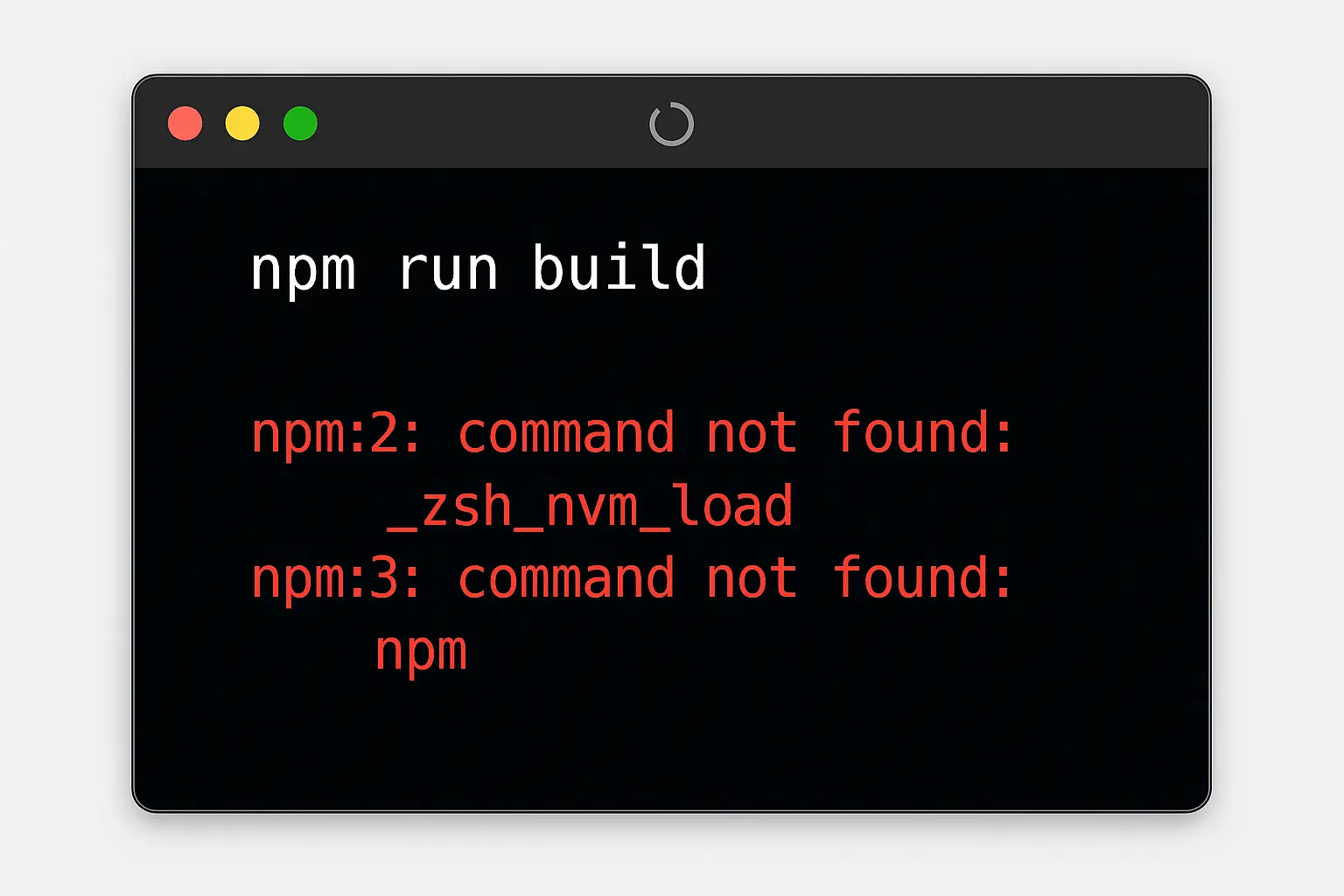
A shell prompt illustration with an error when nvm and npm aren’t found.

NVM install defaults

By default, nvm’s installer will insert itself in the .zshrc shell profile and explains what it’s done.

=> Appending nvm source string to /Users/mattf/.zshrc
=> Appending bash_completion source string to /Users/mattf/.zshrc
=> Close and reopen your terminal to start using nvm or run the following to use it now:

export NVM_DIR="$HOME/.nvm"
[ -s "$NVM_DIR/nvm.sh" ] && \. "$NVM_DIR/nvm.sh" # This loads nvm
[ -s "$NVM_DIR/bash_completion" ] && \. "$NVM_DIR/bash_completion" # This loads nvm bash_completion

Gross… nvm made my shell startup slow!

Yeah, it does. A clever little shell plugin called zsh-nvm by Luke Childs can lazy load NVM to keep fresh sessions snappy.

You might follow the instructions to update your .zshrc file to look like this:

export NVM_LAZY_LOAD=true
source ~/.zsh-nvm/zsh-nvm.plugin.zsh

Suddenly your shell loads something like “370.52% faster.” Victory! Or, not. If we’re using tools like Cursor or Claude Code, we might start seeing other errors:

npm run build

npm:2: command not found: _zsh_nvm_load
npm:3: command not found: npm

Wait? Where did npm go? Claude pokes around to locate the binary and gets past its error, but that’s a waste of time and money. Let’s make it better.

Order of operations on zsh launch

Understanding why Claude can’t locate the zsh-nvm plugin we need to peek at the underlying zsh documentation. Here’s what it explains about .zshrc and files loaded on shell start and stop:

  1. all sessions load .zshenv
  2. then all sessions load .zprofile
  3. then interactive sessions load .zshrc
  4. then login sessions load .zlogin

Claude and other programs use a non-interactive shell, which means that everything declared in your .zshrc file never gets loaded. This is why Claude can’t find zsh-nvm or even npm.

I’m bored. What do I need to fix?

Simple answer is move the NVM-related items to a .zprofile file in the same location as your .zshrc file.

Commands are read by zsh in line-by-line sequence. If you want lazy loading enabled, be sure to declare that preference before the shell sources the plugin.

add these to ~/.zprofile
export NVM_LAZY_LOAD=true
export NVM_DIR="$HOME/.nvm"
source ~/.zsh-nvm/zsh-nvm.plugin.zsh

Remove those same references from .zshrc so they don’t run twice. Voilà.

Raising the third generation of PC builders

· 11 min read

Dedicated to my papa; a great man. 🩵

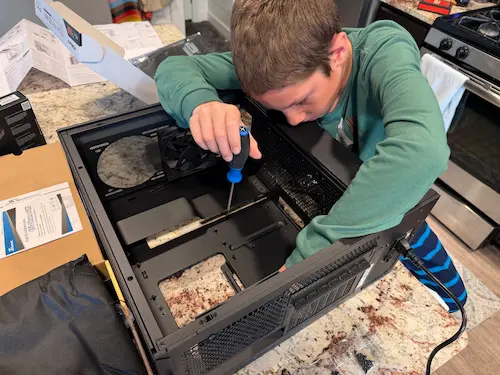
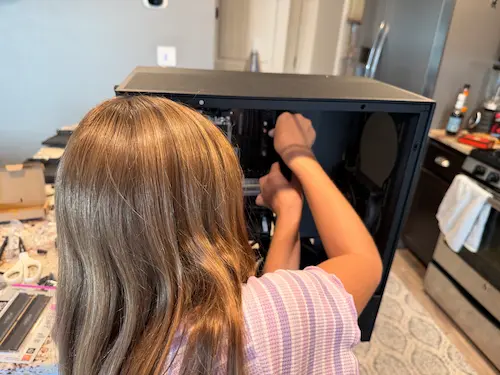
Today I taught my four kids how to build a PC. It was a good activity for a rainy day. As my son tightened the screw to fasten the power supply to the case, I thought “wow, these are third-generation PC builders.” and I started remembering how we got to this point.

For me, it started like this:
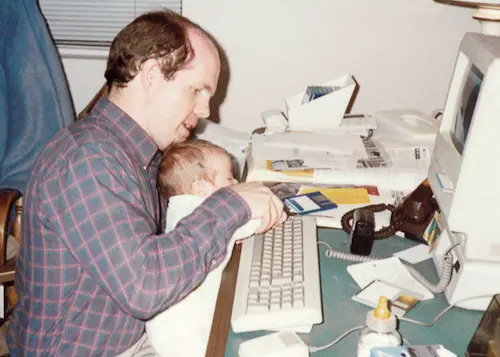
Matt’s father holding him in his lap as an infant typing on a Macintosh SE

/* truncate */

My papa tries to do all the things

At medical school, my father’s curiosity drew him into the university’s mainframe computing lab. He started a parallel degree in computer science so he could figure out what computing was about. He—like many early adopters—saw its potential and wanted to benefit from new technology.

He later realized studying for both degrees concurrently was too much work. He stuck with medicine and turned computers into a hobby. For years, his passion kept our household several steps ahead of the curve. Watching his excitement piqued my curiosity early on.

What do you want to create today?

My parents used Macs. As a toddler, I wanted to play with the computer just like my parents did. My toddler self would create messes in the physical world, like “helping” pour juice and spilling it all over the carpet.

I also quickly learned that I could “help” in my parents’ digital world, making regular improvements to their file organization. Watching the trash icon get fat and skinny over and over again amused me. My parents were not amused.

Macintosh classic icons for the empty and full trash state

One day, my parents attempted to reign in my interest and creativity by installing KidPix, a drawing application that required a password to escape “kid mode.” It didn’t take me long before I figured out repeating certain actions would crash the application and expose the Finder, all the cool applications, and the trash. 😅

Although I’m unsure what backup plan ultimately protected their data from my 3 year-old antics, I know they didn’t dissuade me from playing with our Mac. They also showed me their own creativity with technology—thanks in large part to our LaserWriter printer.

By the time I was in second grade, I watched my mom use our Mac to create all kinds of themed birthday parties and events. She took full advantage of the laser printer’s thermal fuser to print gold foil onto dark blue card stock for the cover page. In my eyes, her themed creations looked like the real deal! She was so good at the themed creations, and I watched her turn it into a small business: “Party in a Box!”

Watching her make money using our computer and printer gave me some business ideas too. I printed flyers on her neon paper scraps offering my neighbors lawn mowing, dog walking, weeding, and house sitting.

By the time I turned eight, I had saved enough money for a right of passage: buying my own computer.

“Come to the dark side, Matt”

Young kids don’t want to appear weird to other kids their age. Most of the parents at my elementary school in the town bordering Redmond, Washington had fallen into money by working for Microsoft in the 1980s and early 1990s. Their kids loved Microsoft, especially because they got to use the free soda machines when they visited their parents office.

Microsoft’s influence in my community was evident. We had just received a grant from the Bill & Melinda Gates foundation: three fancy Gateway 2000 PCs along with licenses to Microsoft Encarta encyclopedia on CD-ROM. Our class field trip went to Seattle Art Museum to gawk at a few pages of Bill Gates’ recently acquired diaries of Leonardo da Vinci. The billboards and radio ads and campus shuttles surrounding me praised Windows 95. Their slogan, “Where do you want to go today” stared at me from dozens of spots on their campus as we drove past to my swim practice. Microsoft was living its best “evil empire” life at the time, and I lived right in its shadow.

When classmates heard that I would buy my own computer, they expected I would pick a Compaq or a Packard-Bell or a Gateway powered by Intel’s flashy new Pentium II processor.

Despite the social pressure to join the dark side, my eight-year-old self knew that I couldn’t create the same things I saw my parents do with a Windows machine. I wanted my creative freedom, just like I do today. I wanted my first computer bought with my own hard-earned money to be a Mac. The Original “Bondi Blue” iMac.

Journal from fourth grade with a picture of my newly purchased iMac G3
My fourth grade teacher required us to keep a journal. On a page about my personal “Circle of life” I pasted a picture of my newly purchased iMac G3… along with a picture of France, me swimming, and a Boeing 727 jet sporting Alaska Airlines colors.

Bullied by Microsofties

The kids at school—and their parents(!)—berated me for my purchase. “Macs are so gay!” some classmates repeated to me day after day—a double whammy.

Undeterred, I used my new iMac to play and build imaginary worlds at home with my siblings. Government systems for our society of plush animals. Newspapers with an advice column penned by our cat. My very first website—coded in the freshly-defined HTML 4.0 spec—featured my Cub Scout pack, our fire station outing, and my allegiance to Cupertino.

While I was enthralled with Mac OS 8.5, my older brother had jumped on the FreeBSD train. I watched him closely during the rare times he would let me into his bedroom. His fingers danced on the keyboard speaking with his command line. His world seemed so strange and different from mine.

One day, his home-built server running FreeBSD on a disused 386 gave up the ghost during a Seattle wind storm. This was a really big deal in our house. That server was our router. At the time, GTE expected residential customers would never have more than one computer. Their approved ADSL modem only allowed a single client. Without this home-built server and its network address translation, our internet connection at home was limited to a single computer.

My dad handed my brother some cash to buy components to build a new server. My brother and I jumped into his Geo Metro and drove an hour up I-405 to the only store in the region that had the components we needed in stock.

I had no idea what my brother was asking the salesperson in the weird-smelling store for. I picked up a few words: Celeron, dual processor, CD-RW drive, 12 hard drive bays, 20GB (huge!!!) hard drives, RAID1 controller, power supply, case fans, and more.

We raced home after finishing our errands. I helped my brother carry everything from the car into his bedroom lair. I watched him carefully assemble our massive new server together.

While I wished my brother had let me help him with the build, I was grateful he let me observe and ask occasional questions. Late in the night he brought our home network back to life. On my way to school the next morning, I wondered “will I ever be smart enough to build a computer like him?”

Pouring water into my apple cider

My creativity grew as I learned how to use more powerful applications on my iMac. A neighbor who worked for Adobe handed us a copy of InDesign 2.0, which I used to make better flyers for odd jobs around my neighborhood. The best paying work was in PC training and troubleshooting.

The shame my classmates had once made me feel about being a dumb, gay Mac user fueled my zealous, teenage snark about Windows, its flaws, and Microsoft’s evil. However, I didn’t need customers to feel stupid while they paid me to exorcise 36 viruses from their machine. Good business required me to practice biting my tongue.

One day, my mother volunteered me to repair a virus-laden PC at our community’s youth chorale. Pro-bono. The choir director was convinced that viruses were causing her computer to suddenly shutdown without warning several times a day. Her PC did have multiple infections including the Anna Kournikova virus and the Code Red worm, but that wasn’t her real problem. Her power supply was on the fritz. Its erratic voltage was about to nuke the system that housed her only copies of member records, accounting files, community sponsor info, email, calendar, and more. She didn’t need a re-install; she needed a new machine.

The choir couldn’t cover the unplanned expense of a replacement computer that year. After my father finished his shift at the emergency room, he saw me poking at the PC. He asked a simple question: “do you think we could build a new one for less money?”

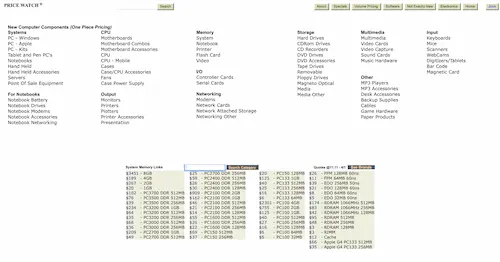
I hadn’t thought of that. He told me to check out pricewatch.com—a website that tracked the best prices of individual PC components—and see if I could price something out. He said he’d help me build a machine if the parts would be significantly cheaper than buying one.

Pricewatch.com in 2001, generated from Archive.org
Pricewatch.com in the early 2000s
Photo: Archive.org Wayback Machine

The build business

Using my spec list, parents of chorale members offered to buy a component or two for the new PC. Some paid for a fan, others a hard drive. I donated my labor. A friend at Microsoft contributed a glossy, new Windows XP Pro retail kit they could get for a few dollars at the Microsoft Employee Store. I suppose the evil empire could do some good.

This first build was painful; some of that pain came from our pointed Mac-ness at home. The motherboard I had picked needed a BIOS update to be compatible with the processor. Getting that BIOS loaded required imaging a floppy disk, something that Apple had deemed obsolete and eliminated five years earlier. Ultimately I got the files loaded onto a floppy using a decade-old Quadra.

After plenty of trial-and-error and some patient help from my father to carefully mount the processor without damaging its pins, the new machine came to life. We took it down to the choir director’s office and started copying files. A few minutes after the last file transferred, the old PC played its usual intermittent shutdown trick. The director pressed the power button to bring it back to life. It didn’t turn on.

My papa and I kept on building PCs for friends and family as a side business. Eventually the cost advantage compared to retail PCs vanished and we moved on, but we had a good time together during those few years.

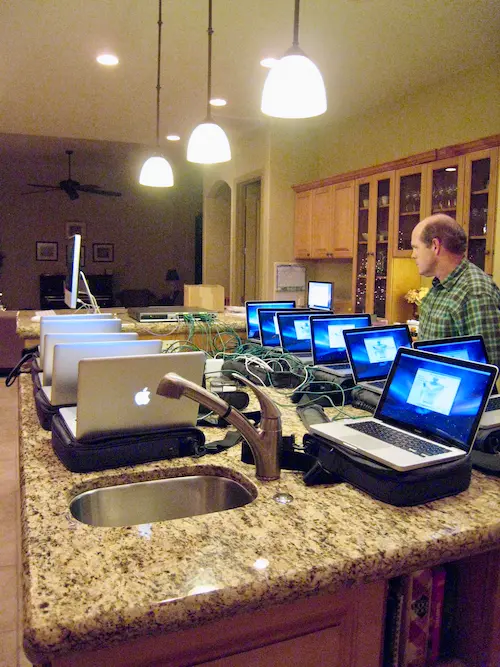
Imaging a bunch of MacBooks with my papa

Teaching my kiddos

A few weeks ago, my oldest son asked me if I still knew how to build a computer and if we could build one together.

Today, my kids learned to build a PC. A third generation is getting their start. I keep thinking: where will they want to go today?

My son screws in motherboard offset mounts

My daughter connecting a power supply to the motherboard

Will airlines get past our distribution deadlock?

· 4 min read

For decades, air travel sales functioned with a simple division of labor: airlines flew planes, travel agents sold most of the tickets, and a handful of intermediaries connected the two sides. This setup worked. However, despite functional relationships between these parties, they were rarely satisfying to airlines.

While carriers struggled with thin margins and often danced with bankruptcy, distribution intermediaries and travel agencies enjoyed healthy profits.

Airline executives watched this disparity with envy as these businesses thrived on the profits of selling the airlines product. Could airlines one day cut them out and keep the money?

/* truncate */

From airline websites to “NDC”

In the 1990s, airlines got their first taste of using the Internet to take away a meaningful portion of sales from agencies by selling on their own websites.

These direct sales initially lured customers away from third party sellers with lower fares, but then intermediaries insisted on pricing parity. Airlines who wouldn’t agree to those terms would get removed from the selling platforms, cutting off a huge portion of their sales. Airlines (mostly) caved.

In 2012, under the IATA industry group banner, airlines launched the New Distribution Capability (NDC) initiative to extend their control over third party distribution. Framed as a technological modernization effort to improve traveler experiences by giving travel sellers APIs to communicate directly with airlines, the underlying goal was obvious. Eliminate the middlemen and capture their revenue.

Early reactions to NDC

In aggregate, the outcomes the NDC program gives airlines, travel sellers, and travelers are underwhelming.

The new APIs can handle only a narrow subset of trip types that travel sellers routinely assemble. Multi-airline itineraries and sophisticated fare combinations are often inaccessible. Faced with NDC’s various shortcomings, travel sellers doubled down on using their decades-old tools. Aging systems held together by figurative duct tape still process the lion’s share of these sales.

Intermediaries like global distribution systems, reading the airlines ambitions with NDC, responded rationally. Investment in their legacy platforms slowed as they waited to see what the new airline-controlled future would deliver. Why overhaul mature systems if they would ultimately be cut out of the picture?

A billion-dollar reckoning ($USD)

Airlines that forced travel agents to rely primarily on the limited capabilities of NDC faced a predictable response. Instead of concocting workarounds to book on American over NDC, travel sellers booked on competing airlines that remained available in their more capable tools.

American Airlines chief commercial officer, Vasu Raja, got pushed out after his NDC initiative cost the airline billions in lost revenue.

Will airlines retreat or advance?

Today, our industry’s distribution future stands at an impasse. Airlines must choose between admitting defeat and retreating to the old separation of duties, or overcoming the limits in direct-selling infrastructure before legacy systems collapse entirely.

At Phocuswire, Sébastien Gibergues notices that potential of NDC and innovation in travel sales is squandered because airlines can’t meet demand for travel searches. He’s not wrong; each week I speak with travel agency partners who want to “revisit” the number of flight searches we allow.[^1] , Amadeus veteran Sébastien Gibergues advocated for a middle path: an "offer distribution platform" that consolidates airline pricing in a central store that can be referenced at much higher volumes than current NDC systems.

This proposed path is a tough pill to swallow. It assumes that some actor is capable of stepping up as an effective new intermediary to perform the functions historically performed by GDSes. It also assumes that airline execs will agree to pay for it.

This approach also duplicates efforts. Maintaining parallel systems for offer generation by travel sellers and live revalidation by airlines doubles computational costs. This approach only makes sense in an industry that accepts inefficiency in exchange for demonstrably increasing sales reach.

The clock is ticking

Until airlines develop the capability to generate millions of personalized offers per second—or acknowledge our more limited offerings—our industry remains trapped in a transition that fractured our past without delivering the future.

The expertise to understand the bajillions of tailored travel offers these decades-old systems produce daily evaporates slowly as people retire or get laid off.

The big question is: will airlines invest enough to develop these capabilities and finally push out the “middle man”?